Video Submission Validator
Check if your video meets the contest requirements

Contest Requirements:
- Resolution: 1920×1080 px OR 3840×2160 px
- Frame Rate: 30.00 fps (exact)
- Frame Count: 120 frames (4 seconds exactly)
- File Type: MP4 or MOV
- Codec: H.264 or H.265
- File Size: Under 100 MB
⚠ IMPORTANT DISCLAIMER ⚠
This browser-based validator has limitations and CANNOT reliably verify:
- Frame Rate - Browser APIs do not expose actual FPS information
- Codec - H.264/H.265 detection is not available in browsers
- Exact Frame Count - Only duration is available, not precise frame data
YOU MUST MANUALLY VERIFY THESE SPECIFICATIONS BEFORE SUBMITTING
How to Verify Your Video Specifications:
Option 1: Windows File Explorer (Quick Check)
- Right-click your video file
- Select "Properties"
- Go to the "Details" tab
- Check "Frame rate" and "Video codec" fields
- Note: Frame count may not be shown; use Option 2 or 3 for frame count
Option 2: FFprobe Online (Browser-Based - Recommended)
- Go to https://ffprobe-wasm.netlify.app/
- Click "Choose File" and select your video

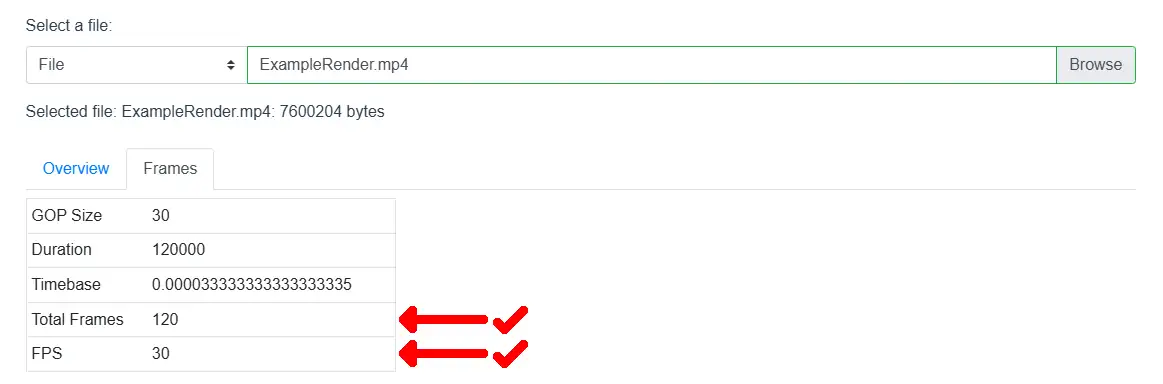
- Look for these specific values in the results:
- r_frame_rate: Should show "30/1" (which equals 30.00 fps)
- nb_frames: Should show exactly "120"
- codec_name: Should show "h264" or "hevc"
- width/height: Should be 1920/1080 or 3840/2160
💡 Tip: This tool runs entirely in your browser - your video never leaves your computer!
Option 3: MediaInfo (Desktop App - Very Accurate)
- Download MediaInfo from https://mediaarea.net/en/MediaInfo
- Install and open MediaInfo
- Drag your video file into MediaInfo
- Check the following fields:
- Frame rate: Should show exactly "30.000 FPS"
- Frame count: Should show exactly "120 frames"
- Format: Should show "AVC" (H.264) or "HEVC" (H.265)
- Width × Height: Should be 1920×1080 or 3840×2160
Option 4: FFmpeg Command Line (For Advanced Users)
Run this command in your terminal:
ffprobe -v error -select_streams v:0 -show_entries stream=codec_name,width,height,r_frame_rate,nb_frames -of default=noprint_wrappers=1 your_video.mp4
Verify the output shows:
- codec_name: h264 or hevc
- r_frame_rate: 30/1 (equals 30.00 fps)
- nb_frames: 120
- width/height: 1920×1080 or 3840×2160